


Recent post
Tampilkan postingan dengan label Tutorial Pemograman. Tampilkan semua postingan
Membangun Browser Sederhana menggunakan Visual Basic 6.0.
Jika anda masuk dan menyimak artikel ini sudah tentu mengenal betul apa itu Visual Basic 6.0, mulai dari interface didalamnya hingga coding dan sintax yang berlaku pada Bahasa Pemrograman Basic yang satu ini, untuk itu saya tak perlu menjelaskan lebih dalam lagi tentang fungsi-fungsi dasar yang berlaku Visual Basic 6.0. Berlanjut kepembahasan membangun Web Browser sederhana menggunakan Visual Basic 6.0 adapun komponen-komponen yang dibutuhkan antara lain Command Buton, Text Box, Label, Webbrowser dan Proggress Bar.

Berikut langkah-langkah detail membangun sebuah Browser Sederhana dengan Visual Basic 6.0 :
- Jalankan dahulu Aplikasi Visual Basic 6.0 yang anda miliki.
- Klik Kanan Pada ToolBox, Kemudian pilih Components atau tekan key Ctrl + T .
- Centang Microsoft html object library, Microsoft internet controls, Microsoft Windows common Controls 5.0 atau 6.0 sama saja.
- Buat 5 Command Buton, 1 Text Box , 1Label, 1 Webbrowser , 1 Proggress Bar. Saran saya tata Seperti Gambar di bawah.
- CommandButton Captionnya dapat anda ganti dengan Back, Forward, Refresh, Stop dan Go. (Caption dapat anda tentukan sendiri karena tak mempengaruhi kerja codding)
- Label Captionnya saya ganti Done
- TextBox Text kalau bisa Kosong aja.
Atur design interface kerja seperti tampilan dibawah ini :

Langkah selanjutnya Masukkan sintax berikut pada halaman console, caranya doble klik pada tool / tombol yang sudah kita buat.
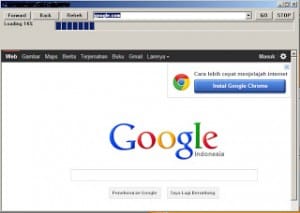
Jika langkah-langkah diatas telah anda ikuti secara benar, coba Jalankan Programnya Browse Sederhana tersebut denga menu Run > Start atau F5. Lanjutkan dengan mebuka sebuah laman web, contoh Google.com maka akan tampak seperti gambar dibawah ini.
Langkah terakhir jika anda ingin mengcompile hasil kerja anda masuk ke Menu File > Make Project1.exe. Simpan hasil kerja anda dalam bentuk file executable atau EXE.
Semoga artikel ini bermanfaat
Konversi angka ke huruf atau sebagian orang yang berkecimpung di dalam dunia pemograman menyebutnya dengan Terbilang, kebetulan kali ini saya mencoba menggunakan VB.NET 2010. Berikut fungsi terbilang menggunakan VB .NET 2010 mencakup sampai dengan bilangan Trilyun.


Terdiri dari
- 1 GroupBox
- 4 Label
- 4 TextBox
- 3 Button
CODE:
Public Class KonvertAngka
 Public Function Terbilang(ByVal x As Double) As String
 Dim isi As Double
 Dim teks As String
 Dim bagian As String
 Dim i As Integer
 Dim tanda As Boolean

 Dim letak(5)
 letak(1) = "ribu "
 letak(2) = "juta "
 letak(3) = "milyar "
 letak(4) = "triliun "
If (x = 0) Then
 Terbilang = "nol"
 Exit Function
 End If
If (x < 2000) Then
 tanda = True
 End If
teks = ""
If (x >= 1.0E+15) Then
 Terbilang = "Nilai terlalu besar"
 Exit Function
 End If
For i = 4 To 1 Step -1
 isi = Int(x / (10 ^ (3 * i)))
 If (isi > 0) Then
 bagian = ratusan(isi, tanda)
 teks = teks & bagian & letak(i)
 End If
 x = x - isi * (10 ^ (3 * i))
 Next
teks = teks & ratusan(x, False)
 Terbilang = teks
 End Function
Function ratusan(ByVal y As Double, ByVal flag As Boolean) As String
 Dim tmp As Double
 Dim bilang As String
 Dim bag As String
 Dim j As Integer
Dim angka(9)
 angka(1) = "se"
 angka(2) = "dua "
 angka(3) = "tiga "
 angka(4) = "empat "
 angka(5) = "lima "
 angka(6) = "enam "
 angka(7) = "tujuh "
 angka(8) = "delapan "
 angka(9) = "sembilan "
Dim posisi(2)
 posisi(1) = "puluh "
 posisi(2) = "ratus "
bilang = ""
 For j = 2 To 1 Step -1
 tmp = Int(y / (10 ^ j))
 If (tmp > 0) Then
 bag = angka(tmp)
 If (j = 1 And tmp = 1) Then
 y = y - tmp * 10 ^ j
 If (y >= 1) Then
 posisi(j) = "belas "
 Else
 angka(y) = "se"
 End If
 bilang = bilang & angka(y) & posisi(j)
 ratusan = bilang
 Exit Function
 Else
 bilang = bilang & bag & posisi(j)
 End If
 End If
 y = y - tmp * 10 ^ j
 Next
If (flag = False) Then
 angka(1) = "satu"
 End If
 bilang = bilang & angka(y)
 ratusan = bilang
 End Function
Private Sub Button2_Click(ByVal sender As System.Object, ByVal e As System.EventArgs) Handles Button2.Click
 Me.Close()
 End Sub
Private Sub Button1_Click(ByVal sender As System.Object, ByVal e As System.EventArgs) Handles Button1.Click
 Dim angka As Double
 Dim teks As String
 angka = Val(txthasil.Text)
 teks = Terbilang(angka)
 txtterbilang.Text = teks
If txthasil.Text = "" Then
 txtterbilang.Text = "input angka!"
 End If
If Not IsNumeric(txthasil.Text) Then
 txtterbilang.Text = "Input angka, bukan huruf!"
 End If
End Sub

 Private Sub Button3_Click(ByVal sender As System.Object, ByVal e As System.EventArgs) Handles Button3.Click
 Dim angka1 As Long
 Dim angka2 As Long
 Dim hasil As Long
angka1 = Val(txtangka1.Text)
 angka2 = Val(txtangka2.Text)
 hasil = angka1 + angka2
 txthasil.Text = hasil
End Sub
End Class
Nah, Program sederhana “Konversi Angka ke Huruf Menggunakan VB.NET 2010″ anda juga bisa Download disini
Semoga bermanfaat.

TurboC++ for Windows is a modified version of the Borland Turbo C++ that can be run on newer versions of Windows, such as Vista, 7 and 8. The application sports all the features of the old IDE, eliminating all the incompatibility issues that are encountered in a normal Turbo C++ installation on modern Windows editions.
Borland achieved an immense success with the release of Turbo and Borland C++, which were, at the time, the most reliable IDE platforms for amateur and professional programmers. Over the time, Turbo C++ underwent a series of modifications, development was ceased and resumed, which finally, led to a complete metamorphosis of the product to C++ Builder, now owned by Embarcadero.
Regardless of these transformations, programmers all over the world remained faithful to the old Turbo C++. Unfortunately, the program’s compatibility with the latest Windows versions is debatable, but still achievable. There are a few workarounds that involve the use of Dosbox to emulate the old DOS environment, one of which is TurboC++ for Windows.
This is one of the most reliable alternatives to manually attempting to solve Turbo C++ incompatibility issues with Windows Vista, 7 and 8. The solution relies on the aforementioned Dosbox and includes a couple of code adjustments to manage the successful launch and proper functioning of the program.
TurboC++ for Windows bundles all the features of the old IDE; it includes a compiler, a debugger, the DOS shell, breakpoints, code inspection, watches, tracing, to name the most important ones. The program also incorporates a few project samples and runs in full screen mode only.
The advantages that TurboC++ for Windows brings to the table are numerous. Aside from solving Windows compatibility issues, it relies on a simple installation procedure, decent code processing speed and requires few user efforts.
In conclusion, Turbo C++ fans should definitely take it for a spin. There aren’t many similar solutions anyway, so the software market falls short of competitors.


